A named team for your account
The same developers stay responsible for your site for as long as the plan is active.
The volume
Practice areas
More practice areas
Design
Build, search and scale
The site
The management
Service
A law firm website development company is worth judging less by who builds the site and more by who is still responsible for it a year later, since a site that nobody maintains starts falling behind the day it launches. A one-and-done developer builds what was scoped, sends a final invoice, and has no further obligation to the firm. A fully managed plan keeps a named team accountable for revisions, hosting and new content for as long as the plan is active, which is the actual gap between the two models firms tend not to notice until they need something changed.
What it costs
Signs you need it
Most development engagements split into two separate problems: someone builds the site, and, often nobody in particular, keeps it current afterward. A developer paid for a fixed-scope project has no ongoing incentive to notice that a practice-area page is now outdated or that a new attorney never got added. Two years is a common point where a firm realizes its site still lists an attorney who left, because the original build was a project with an end date, not a relationship with any ongoing responsibility attached to it. By the time anyone notices, the fix usually requires re-engaging a developer who may no longer be available or familiar with the original build at all.
Under a plan, the same accountability applies every week: revisions land in a client portal and get handled in 2 to 5 working days, 2 to 3 new articles publish on schedule, and hosting uptime is the studio's problem, not something the firm discovers has lapsed. There is no separate maintenance retainer to negotiate later, since upkeep is part of what the monthly plan already covers from day one. There is also no gap between hosting an initial version of a site and hosting the version the firm actually needs six months later, since the same team responsible for the build is the one watching uptime and handling every change afterward.
Consider a firm that grew from four attorneys to seven partway through its plan. Each new attorney needed a profile page, and each one was added as a revision, covered by the plan's monthly allotment, not billed as a new development project or negotiated as a scope change. A firm working with a one-and-done developer facing the same growth usually has to source a new quote for what should be routine content work. That difference matters most during exactly the period a growing firm can least afford delay, since a new attorney typically wants to be visible on the site well before their first case actually begins.
Solo Practice at $137 a month fits a one-or-two-attorney firm and builds in 7 days. Multi-Attorney at $297 a month plus AI usage fits a growing firm and builds in 10 days. Multi-Office at $747 a month adds location pages per office and builds in 15 days. Each plan includes the same underlying development quality, the difference is scale, not a lesser or greater level of build attention. A one-attorney firm and a fifteen-attorney firm both get the same 90+ PageSpeed guarantee, the same hand-coded build quality and the same client portal, the plans simply size the number of pages, offices and attorney profiles to what each firm actually needs.
Who it is for
How the work runs
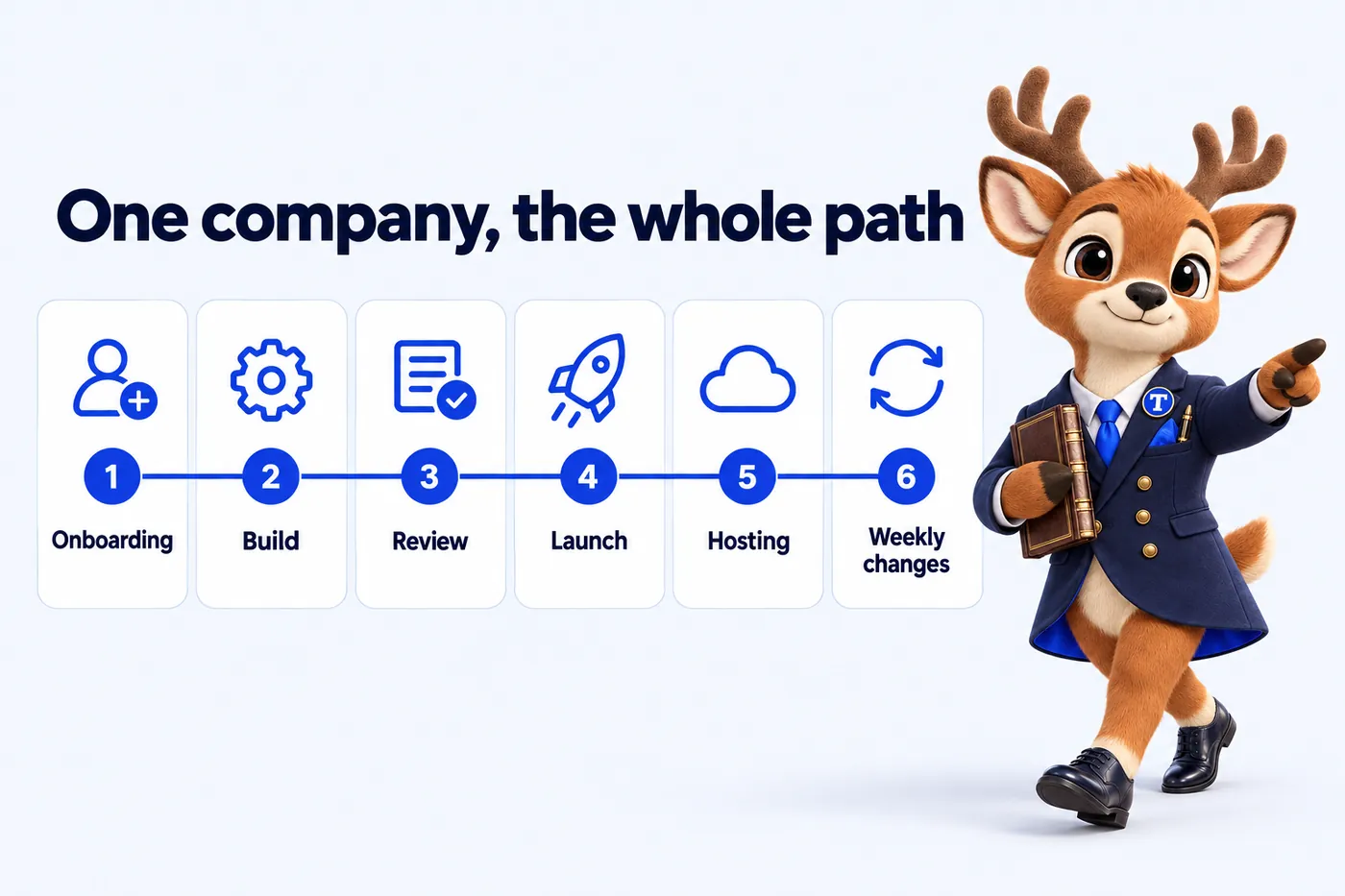
One company handles the whole path: onboarding, build, review, launch, hosting and every weekly change, with one client portal for everything afterwards.
Pay the first monthly invoice
The only payment before launch. It starts the build and covers your first month once the site is live.
Onboarding form and one call
Offices, attorneys, matter types, consultation terms and routing rules. About 15 minutes of form, one call to confirm it.
The studio designs and builds
Practice area pages, office pages, attorney profiles, the intake router, the CRM connection and redirects from your old site.
You review on a private link
Mark up anything you want changed. Nothing goes live until the firm approves it.
Launch, then every week
Live on your domain in 7, 10 or 15 days depending on plan. Weekly updates and articles start the same week.
7 days on Solo Practice10 days on Multi-Attorney15 days on Multi-Office
Deliverables
The same developers stay responsible for your site for as long as the plan is active.
2 to 3 new articles a week, 2,500 to 3,200 words each, keeping the site actively growing.
Covers new pages and edits alike, raised in the portal, completed in 2 to 5 working days.
A structured intake that gathers what the build actually needs before development starts.
Live the day your site launches, for revisions, support tickets and sending files directly.
Cloudflare's network, SSL and uptime handled by the studio, not a separate line item to track.
What it costs
The price is set by plan, not by page count or hours. Every plan carries the same design and build quality; what changes is what answers the phone and how much is published each week.
| Plan | Monthly | Live in | Best for |
|---|---|---|---|
| Solo Practice | $137 / month | 7 days | The website, fully managed |
| Multi-Attorney | $297 / month + usage | 10 days | Everything, plus the AI Engine |
| Multi-Office | $747 / month | 15 days | Everything, plus the Content Engine |
Plus a $797 one-time build fee, invoiced only after launch and approval. Engagements started on or before Thursday, December 31, 2026 have the $797 build fee waived, so that invoice is never raised. Extra revisions beyond 5 a month are $20 each.
Next
A live walk-through with your offices, attorneys and matter types on the screen, about 30 minutes. Live in 7 days from the first invoice.
Included by plan
Whichever service brought you here, the plan includes the same site, intake and management. This is what each plan carries.
| Capability | Solo Practice$137/ month | Multi-Attorney$297/ month + usage | Multi-Office$747/ month |
|---|---|---|---|
| Pages that open instantlyStatic, hand-built pages served from the edge, 90+ PageSpeed guaranteed on mobile and desktop. | Included | Included | Included |
| Practice area pagesOne well-structured page for every matter type the firm takes, written answer-first. | Included | Included | Included |
| Office and attorney pagesA location page for every office and a profile for every attorney, all inside one site. | Included | Included | Included |
| Intake routerThree questions, then the inquiry goes to the right office or attorney with the consultation terms shown. | Included | Included | Included |
| Inquiries into your intake CRMEvery form, router and call inquiry lands in the CRM your intake team already uses. | Included | Included | Included |
| Weekly detail updatesAttorney moves, new hours, new bar admissions and fee changes published every week without using a revision. | Included | Included | Included |
| Researched articles2 long-form, cited articles a week on the questions people search before they contact a firm. | Included | Included | Included |
| Search, answer and AI visibilityTechnical and on-page SEO, office and service-area pages, answer-first FAQs, schema and llms.txt, so search engines and AI assistants can read the firm correctly. | Included | Included | Included |
| Managed hostingCloudflare edge hosting, SSL, backups and monitoring inside the monthly fee. Nothing itemized. | Included | Included | Included |
| The AI EngineAn AI receptionist, site chat and SMS, Messenger and Instagram agents that take inquiries and book consultations, never give advice. | Not included | Included | Included |
| The Content Engine3 articles a week, 3 social image posts, 2 reels and a managed Google Business Profile for each office. | Not included | Not included | Included |
In their words
Our deliberately awkward question was: what if the legal intake form breaks? They added a clear alternative contact route and verified that test messages reach the right inbox. That attention to the invisible parts of the site gave me confidence in the handover.
GotContact resilience and delivery checks for legal intake on Solo Practice
The documentation for the legal intake pages assumes nothing about the reader. It covers who to contact, how to request a change and what to check after publication. It has already earned its keep during one absence and one staff change.
GotStaff handover and maintenance notes for legal intake on Solo Practice
Case studies
Not included
Legal advice or a compliance sign-off
We are not a law firm. We write to avoid outcome claims and add the disclaimers you ask for, but the firm reviews its content and stays responsible for its advertising rules.
Revisions beyond 5 a month
Each extra revision is a flat $20, with no hourly billing. Weekly detail updates never count as revisions.
AI usage on the AI Engine plans
The AI Engine is inside the Multi-Attorney and Multi-Office fee; the minutes answered and messages handled are billed at cost each month, with a running total you can see.
The AI Engine on Solo Practice
Solo Practice carries the full site, intake router and management. The AI receptionist, chat and messaging agents start on Multi-Attorney.
Social posts, reels and Google Business Profiles below Multi-Office
The Content Engine is on Multi-Office only. The other plans carry 2 researched articles a week.
A photographer on site
We give photography direction and build around the photos you send, or design pages that work without photos. We do not send a photographer.
Heavy third-party scripts against our advice
The 90+ PageSpeed guarantee does not cover scripts you ask us to add after we have told you what they will cost the score.
The terms of engagement
Six commitments, stated as terms rather than slogans, with the conditions visible.
The $797 build fee is invoiced only once the site is live and the firm has approved it. Engagements started on or before Thursday, December 31, 2026 have the $797 build fee waived, so that invoice is never raised.
You review the whole site on a private link and mark up what you want changed. Changes at that stage do not use your monthly revisions.
Every page we build and host scores 90+ on Google PageSpeed Insights for mobile and desktop. If a page drops below because of something we did, we fix it at no charge.
Local searches in your area start ranking within 3 to 5 months of launch, or the search work continues at no extra charge until they do.
There is no contract length. Cancel by email with at least 2 business days before your next invoice date, and no further invoice is charged.
The domain is registered in the firm's name or stays in it. On cancellation you get an export of your content and articles within 14 days.
All sales are final: the one refund the studio makes is for a duplicate or incorrect charge caused by its own billing, reported within 30 days. The refund policy sets out how that works. Read the refund policy.
Hosting, weekly content publishing, monthly revisions and a client portal are part of every plan, not sold as separate services after the build.
Both. A new attorney profile or a new office page is a revision like any other, subject to the same monthly allotment and turnaround.
A one-time $797 build fee is invoiced only after launch and your approval, followed by your plan's monthly rate.
Yes, from Solo Practice to Multi-Attorney to Multi-Office, as the firm's attorney count or office count actually changes.
We do, on Cloudflare, inside the monthly fee. SSL, monitoring and versioned deploys are included.
We monitor it, so we usually know before you do, and fixing it is our job, not a billable ticket.
Yes, from the day the site goes live, for revisions, support tickets, files and messages.
Yes. There is no fixed term, the domain is the firm's, and you receive an export of your content and articles within 14 days of cancelling.
A live walk-through of the site you would get, in about 30 minutes. Plans from $137 a month, the $797 build fee invoiced only after launch, domain and hosting included.
Book a demoOr email and a person replies within one working day.
AttorneyWebStudio uses the cookies below. Necessary cookies keep the site working and cannot be turned off.
Saved on this device only. Press Esc to close.